


MBTA mTicket
3.0567.00 Reviews
App Specs
- Version
- 7.9.4
- Updated On
- License
- Free
- Downloads
- 500,000+
- Developer
- MBTA
- Categories
- Maps & Navigation
- Platform
- Android, iOS
Screenshots
 Analysis by AppCompare
If you’re anything like me, the daily grind of commuting can be a bit of a drag. Whether you’re rushing to work or heading out for a weekend adventure, the last thing you want to worry about is fumbling with paper tickets or missing your train because of a long line at the ticket booth. Enter the MBTA mTicket app—your new commuting sidekick.
Who benefits most from a mobile ticket
I find this app most useful when my trip is already planned and I want to handle the fare before I reach the station. Commuter rail and ferry riders are the natural audience: buying on a phone can remove one errand from a rushed departure, and keeping a purchased ticket accessible is simpler than remembering which pocket holds a paper one. It is especially appealing if you travel these services regularly enough to value a repeatable routine, but not so often that you want to manage every part of your journey in a separate tool.
It is less compelling if you mainly ride local buses or the subway, or if you need one app to plan and pay for every part of a mixed-mode trip. In that case, I would use the relevant MBTA tools or other current sources for the services involved, rather than assume mTicket covers the whole journey. Its strength is a focused ticketing task, not being a universal Boston transit planner.
Set yourself up before the station rush
For a first-time user, I’d install the app while I have a calm moment, then look through the available choices before travel day. That gives me time to select the service and ticket that match my actual trip, rather than trying to make a decision while a train is approaching. The MBTA is the developer, and the app is free, so the main preparation is simply having the phone ready and allowing enough time to complete the purchase.
One practical habit is to check the ticket details before paying: make sure the service and fare choice suit the journey you intend to take. A mobile purchase is convenient, but it does not remove the need to understand which ticket you need. I would also open the app before leaving home and confirm that I can reach the ticket area, instead of discovering a login or loading snag at the platform.
A useful first-trip routine
Imagine leaving work later than planned and heading to a commuter rail station. Rather than arriving and joining a ticket line, I can use the app to make the purchase on the way, then bring up the ticket when it is time to board. That is the sort of small, ordinary moment where mobile ticketing earns its place: it reduces one source of last-minute friction without pretending to solve every travel problem.
For a smoother first ride, I’d avoid waiting until the doors are closing to open the app. Bring up the ticket while there is still time, keep the screen easy to reach, and follow the conductor’s instructions when showing it. If the phone is low on battery or the app is taking a while to load, having planned ahead matters more than any interface shortcut. This is a useful trade-off to remember: the ticket is convenient on a phone, but access to that phone becomes part of the travel routine.
Worth Reading Before You Choose

EA SPORTS FC Mobile 26 Is a Bigger Football Game, but It Takes Time

Flipboard Shows What News Apps Must Do Beyond the Feed

Switching to Android Auto Means Rethinking Your Driving Routine

Google Calendar Makes a Crowded Week Easier to Manage

Ludo King Makes the Most of the Minutes Between Plans

Baby Panda World Brings Quick Play to Modern Phones, but Its Game Library Feels Busy
All Aboard the Digital Train
The MBTA mTicket app is a mobile ticketing solution for the Massachusetts Bay Transportation Authority. Simply put, it lets you buy and use tickets for commuter rail and ferry services right from your smartphone. This app is available for both Android and iOS, which means pretty much everyone can get in on the action.
First impressions? The app is sleek and user-friendly. I downloaded it straight from the app store, and within minutes, I was ready to roll. The interface is intuitive, so even if tech isn’t really your thing, you’ll find your way around pretty easily.
In practical terms, it belongs to Maps & Navigation, though its day-to-day job is narrower than a map app: it is built around MBTA rail and ferry tickets. It has a 3.0 average from around 1.6K ratings, with 567 written reviews, and has passed over 500K installs. I treat those figures as context rather than a verdict; the important question is whether its specific services match the trip I need to take.
The app has been around since Nov 8, 2012, and its current version is 7.9.4, with Android 7.0 as the minimum system requirement. It is rated Everyone. Those details make it easier to judge basic compatibility, but I would still check that the app runs properly on my own phone before relying on it for a time-sensitive journey.
Buying Tickets: A Breeze
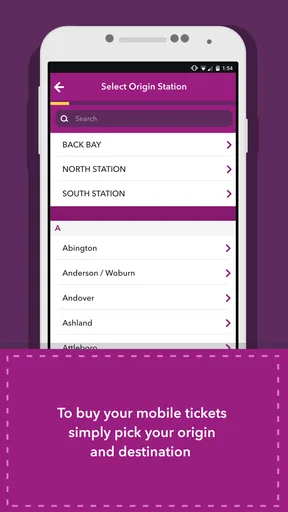
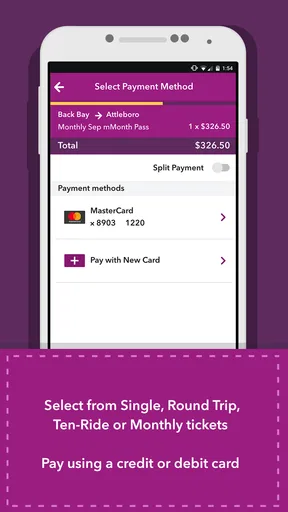
Buying a ticket is as easy as pie. You can purchase single ride tickets or save a bit with a monthly pass. Once you’ve selected your preferred route, the app offers several payment options. You can use a credit card, debit card, or even PayPal. The transaction is secure, which is always a plus in my book.
No more digging for change or worrying about expired tickets. The app stores your purchases, and you can easily access them whenever you need. Plus, you get a notification when your ticket is about to expire, so you’re never caught off guard.
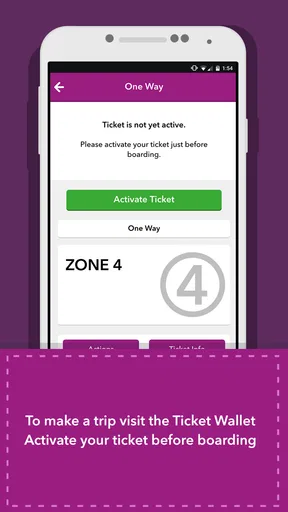
The most useful point for a new rider is to separate buying from using: completing a purchase does not mean I should wait until the last second to find the ticket again. I’d check the ticket’s status and the instructions shown in the app before boarding, especially if I have bought a pass in advance. A simple routine—choose carefully, purchase, then locate the ticket before the trip—helps avoid confusing a saved purchase with a ticket that is ready to present.
On-the-Go Convenience
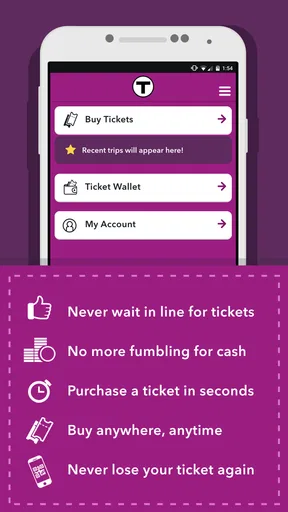
One thing I absolutely love about the MBTA mTicket app is the convenience. I mean, who doesn’t love the idea of having everything at their fingertips? Just open the app, show your digital ticket to the conductor, and you’re golden. No more paper tickets to keep track of, and definitely no more waiting in line at the station.
The app is also super handy for checking schedules. You can view train and ferry times, and even get alerts about delays or schedule changes. This feature is a lifesaver, especially if you’re like me and tend to cut it close sometimes.
I would still think of ticketing and trip planning as related but distinct jobs. If I am deciding which route to take, comparing a connection, or navigating an unfamiliar neighborhood, a dedicated map or transit-planning service may be more useful than a ticket-focused app. Once I know that an MBTA commuter rail or ferry trip is the one I want, mTicket makes more sense as the place to handle the fare.
That distinction is also useful for visitors. Someone making a one-off trip can use the app for the ticketing part without assuming it will explain every transfer or local connection. I’d plan the full journey first, then use mTicket for the part it is designed to serve. For a regular rider, keeping that division clear can prevent a frustrating search for bus or subway information in the wrong place.
Room for Improvement
While the app is pretty solid, it’s not without its quirks. Some users have reported occasional glitches, like the app freezing or tickets not loading properly. It’s not a deal-breaker, but it’s something to keep in mind. The developers seem responsive to feedback, so hopefully, these issues will get ironed out in future updates.
Another thing—it would be awesome if the app extended its functionality to include bus schedules and ticketing. As of now, it’s limited to commuter rail and ferry services, which is great, but more is always better, right?
That limitation is not just a missing extra; it affects who should choose the app. If most of my travel depends on buses or subway service, I would not make mTicket my sole transit companion. Likewise, a rider who wants one place to plan an entire journey may prefer a broader navigation app and use mTicket only when a commuter rail or ferry ticket is needed.
Because a phone app can occasionally be slow or unavailable, I’d also avoid making the first attempt to open a ticket while boarding is already underway. Give the screen a moment to load before reaching the conductor, and keep enough battery for the trip. Those are small habits, but they address the most inconvenient failure points without assuming the app will always behave perfectly.
Final Thoughts
All in all, the MBTA mTicket app is a game-changer for anyone commuting in the Boston area. It’s convenient, easy to use, and saves you a ton of time and hassle. While there are a few minor bumps, the overall experience is positive and definitely worth checking out.
If you’re tired of dealing with paper tickets and want a smooth, streamlined way to manage your commute, give the MBTA mTicket app a try. You’ll wonder how you ever lived without it!
My recommendation is straightforward: if your regular travel includes MBTA commuter rail or ferry service, try it on a trip where you have time to get comfortable with the purchase and ticket display. If you rely mostly on other transit modes, or want a single tool for route discovery, connections, and fares across the whole network, choose a broader planning option first. Used for its specific purpose, mTicket can make the ticket portion of a journey feel pleasantly routine.
Pros
- Convenient mobile ticketing system.
- Supports multiple payment methods.
- Real-time schedule updates.
- User-friendly interface design.
- No need for physical tickets.
Cons
- Limited to specific transit areas.
- Occasional app crashes reported.
- Requires internet for ticket purchases.
- No offline mode for schedules.
- Some users report slow loading times.
FAQs for MBTA mTicket
What is the MBTA mTicket app used for?
The MBTA mTicket app allows users to purchase and display tickets for the Massachusetts Bay Transportation Authority's commuter rail services. Travelers can conveniently buy tickets anytime, anywhere, and present them directly from their smartphone, eliminating the need for paper tickets and making the commuting experience smoother and more efficient.
How do I purchase and activate a ticket on the MBTA mTicket app?
To purchase a ticket, simply download the MBTA mTicket app, create an account, and select your desired route and ticket type. Once purchased, tickets can be activated just before boarding. Open the app, navigate to 'My Tickets,' and tap 'Activate' to validate your ticket for your journey.
Is the MBTA mTicket app available for both Android and iOS devices?
Yes, the MBTA mTicket app is available for both Android and iOS devices. You can download it for free from the Google Play Store or the Apple App Store. Ensure your device meets the minimum system requirements for smooth operation and access to the latest features.
Can I use the MBTA mTicket app for group purchases or multiple travelers?
Yes, the MBTA mTicket app allows you to purchase tickets for multiple travelers. When buying tickets, select the number of passengers, and the app will generate individual tickets for each traveler. This feature is especially useful for families or groups traveling together.
What should I do if I encounter issues with my MBTA mTicket app?
If you experience problems with the MBTA mTicket app, such as trouble purchasing or activating tickets, try restarting the app or your device. For persistent issues, contact MBTA customer support through the app for assistance. Ensure your app is updated to the latest version for optimal performance.


